
Every successful business relies on accurate financial information to make informed decisions, comply with regulations, attract investors, and maintain profitability. Whether a company is a small startup or a large corporation, accounting serves as the foundation of financial management. However, accounting is not simply about recording transactions. It involves a systematic process known as the accounting cycle.
The accounting cycle is a series of steps that businesses follow to identify, record, classify, summarize, and report financial transactions during a specific accounting period. It ensures that financial statements are accurate, complete, and prepared according to generally accepted accounting principles (GAAP).
The accounting cycle helps businesses maintain organized financial records, detect errors, prepare tax filings, and evaluate overall financial performance. Without a structured accounting cycle, companies may struggle with inaccurate reporting, compliance issues, and poor decision-making.
In this comprehensive guide, we will explain the accounting cycle step by step, discuss its importance, provide practical examples, explore common challenges, and share best practices for effective financial management.
What Is the Accounting Cycle?
The accounting cycle is a standardized process used to record and process all financial transactions during an accounting period. It begins when a transaction occurs and ends when financial statements are prepared and temporary accounts are closed.
The purpose of the accounting cycle is to ensure that every financial transaction is properly documented and reflected in the company’s financial records. By following a structured process, businesses can produce accurate financial statements and maintain compliance with accounting standards.
The accounting cycle is typically completed monthly, quarterly, or annually, depending on the organization’s reporting requirements.
Simple Example
Suppose a company purchases office supplies for $1,000 in cash. The transaction must be identified, recorded in the journal, posted to the ledger, included in the trial balance, adjusted if necessary, and ultimately reflected in the financial statements. The accounting cycle ensures that this process is completed accurately and consistently.
Why Is the Accounting Cycle Important?
A well-managed accounting cycle provides numerous benefits for businesses.
Improves Financial Accuracy
The accounting cycle ensures that every transaction is recorded and reviewed systematically, reducing the risk of errors and omissions.
Supports Better Decision-Making
Accurate financial information helps business owners and managers make informed operational and strategic decisions.
Ensures Regulatory Compliance
The accounting cycle helps organizations comply with accounting standards, tax regulations, and reporting requirements.
Facilitates Financial Reporting
Financial statements generated through the accounting cycle provide valuable insights into business performance and financial position.
Detects Errors and Fraud
Regular reconciliations and adjustments help identify discrepancies, unusual transactions, and potential fraud risks.
Enhances Investor Confidence
Reliable financial statements increase trust among investors, lenders, and other stakeholders.
Simplifies Tax Preparation
Accurate accounting records make tax calculations and filings more efficient and less stressful.
Supports Business Growth
Strong financial reporting enables businesses to secure funding, manage cash flow, and plan for expansion.
Overview of the Accounting Cycle
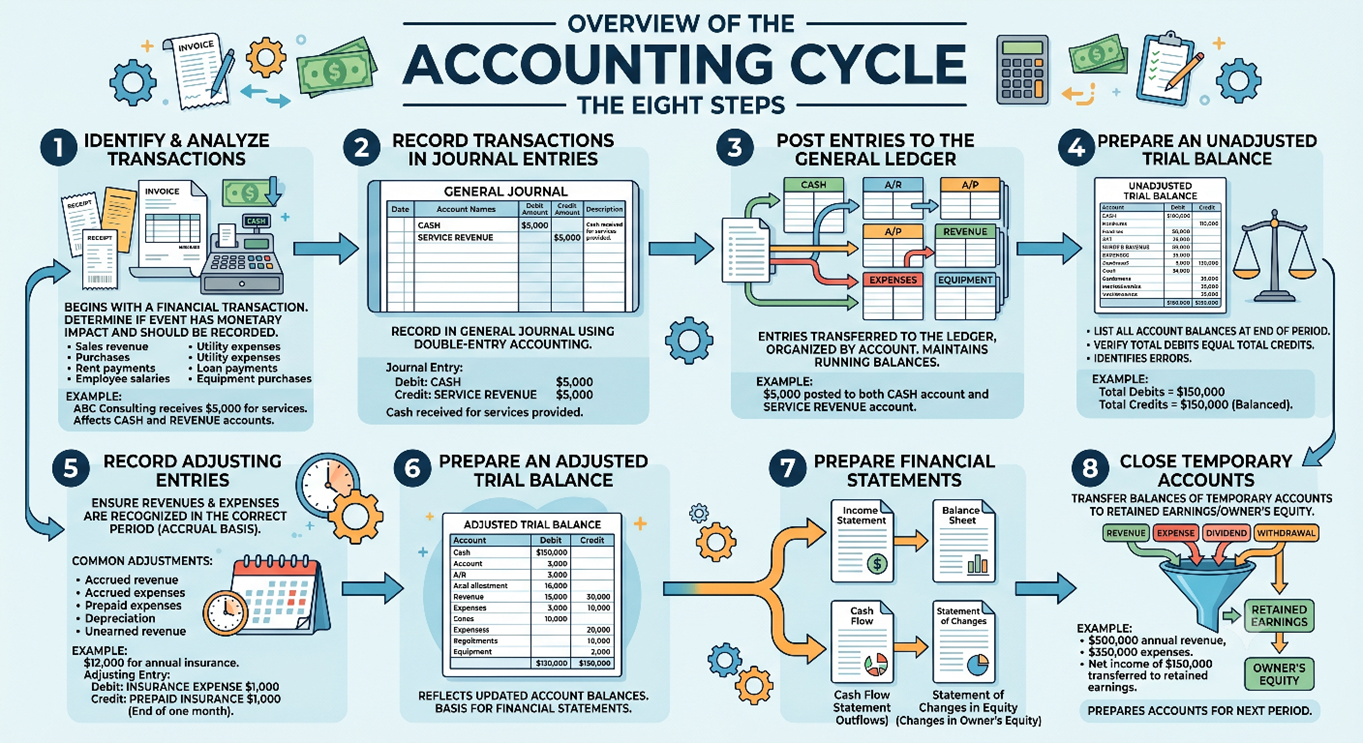
The accounting cycle typically consists of the following eight steps:
- Identify and analyze transactions
- Record transactions in journal entries
- Post entries to the general ledger
- Prepare an unadjusted trial balance
- Record adjusting entries
- Prepare an adjusted trial balance
- Prepare financial statements
- Close temporary accounts
Each step contributes to the accuracy and completeness of financial reporting.
Step 1: Identify and Analyze Transactions
The accounting cycle begins when a financial transaction occurs. Businesses must determine whether the event has a monetary impact and should be recorded in the accounting system.
Common transactions include:
- Sales revenue
- Purchases
- Rent payments
- Employee salaries
- Utility expenses
- Loan payments
- Equipment purchases
Example
ABC Consulting receives $5,000 from a client for services provided.
The accountant determines that the transaction affects cash and revenue accounts and should therefore be recorded.
Step 2: Record Transactions in Journal Entries
Once a transaction is identified, it is recorded in the general journal using the double-entry accounting system.
Every journal entry includes:
- Date
- Account names
- Debit amount
- Credit amount
- Description
Example
ABC Consulting receives $5,000 in cash from a client.
Journal Entry
Debit: Cash $5,000
Credit: Service Revenue $5,000
This entry increases both cash and revenue.
Step 3: Post Entries to the General Ledger
After journal entries are recorded, they are transferred to the general ledger. The ledger organizes transactions by account and maintains running balances.
Common ledger accounts include:
- Cash
- Accounts Receivable
- Accounts Payable
- Revenue
- Expenses
- Equipment
Example
The $5,000 cash receipt is posted to both the Cash account and Service Revenue account in the ledger.
This step allows accountants to track account balances throughout the accounting period.
Step 4: Prepare an Unadjusted Trial Balance
At the end of the accounting period, businesses prepare an unadjusted trial balance. This report lists all account balances and verifies that total debits equal total credits.
The trial balance serves as an important checkpoint for identifying posting errors and ensuring mathematical accuracy.
Example
If total debits equal $150,000 and total credits equal $150,000, the trial balance is considered balanced.
However, further adjustments may still be required.
Step 5: Record Adjusting Entries
Adjusting entries ensure that revenues and expenses are recognized in the correct accounting period according to the accrual basis of accounting.
Common adjustments include:
- Accrued revenue
- Accrued expenses
- Prepaid expenses
- Depreciation
- Unearned revenue
Example
A company pays $12,000 for annual insurance coverage.
At the end of one month, $1,000 is recognized as an insurance expense.
Adjusting Entry:
Debit: Insurance Expense $1,000
Credit: Prepaid Insurance $1,000
This adjustment matches expenses with the period in which they are incurred.
Step 6: Prepare an Adjusted Trial Balance
After all adjusting entries are recorded, an adjusted trial balance is prepared.
This report reflects updated account balances and serves as the basis for preparing financial statements.
The adjusted trial balance helps ensure that all necessary adjustments have been recorded correctly before financial reporting begins.
Step 7: Prepare Financial Statements
The adjusted trial balance is used to prepare the company’s financial statements.
The primary financial statements include:
Income Statement
Reports revenues, expenses, and net income.
Balance Sheet
Reports assets, liabilities, and equity.
Cash Flow Statement
Reports cash inflows and outflows.
Statement of Changes in Equity
Reports changes in owner’s equity.
These reports provide stakeholders with valuable information about the company’s financial performance and position.
Step 8: Close Temporary Accounts
The final step in the accounting cycle involves closing temporary accounts.
Temporary accounts include:
- Revenue accounts
- Expense accounts
- Dividend accounts
- Withdrawal accounts
Their balances are transferred to retained earnings or owner’s equity.
Example
If annual revenue is $500,000 and expenses are $350,000, the resulting net income of $150,000 is transferred to retained earnings.
This process prepares the accounts for the next accounting period.
Complete Accounting Cycle Example
Consider a small consulting firm called ABC Consulting.
During January, the company performs the following activities:
- Provides consulting services worth $10,000
- Receives $7,000 in cash
- Purchases office supplies worth $1,000
- Pays rent of $2,000
- Records monthly depreciation of $500
These transactions are identified, journalized, posted to the ledger, included in the trial balance, adjusted as necessary, and ultimately reflected in the financial statements.
After all entries and adjustments are completed, the company prepares its income statement, balance sheet, and cash flow statement before closing temporary accounts and beginning the next accounting period.
This example illustrates how each stage of the accounting cycle works together to produce accurate financial information.
Common Challenges in the Accounting Cycle
Even though the accounting cycle provides a structured framework for recording and reporting financial transactions, businesses often face several challenges that can affect the accuracy and efficiency of the process. Errors, delays, and inadequate controls can lead to inaccurate financial statements, compliance issues, and poor business decisions. Understanding these challenges can help organizations implement stronger accounting practices and improve financial reporting.
Data Entry Errors
One of the most common challenges in the accounting cycle is data entry errors. Incorrect account selection, duplicate entries, transposed numbers, or missing transactions can create inaccuracies in financial records. Even a small mistake can affect account balances and lead to inaccurate financial statements. Regular reviews, reconciliations, and automated accounting systems can help reduce the risk of human error.
Missing or Incomplete Documentation
Accurate accounting depends on proper documentation for every financial transaction. Missing invoices, receipts, purchase orders, contracts, or payment records can make it difficult to verify transactions and support financial reporting. Incomplete documentation may also create problems during audits and tax filings. Businesses should establish procedures for maintaining organized and accessible financial records.
Delayed Transaction Recording
Transactions that are not recorded promptly can result in outdated financial information and inaccurate reporting. Delays often occur when departments fail to submit supporting documents on time or when accounting teams are overwhelmed with manual processes. Recording transactions as they occur helps ensure that financial reports accurately reflect the company’s current financial position.
Incorrect Adjusting Entries
Adjusting entries are essential for recognizing revenues and expenses in the correct accounting period. However, errors in accruals, depreciation calculations, prepaid expenses, or unearned revenue adjustments can significantly impact financial statements. Businesses should carefully review all adjusting entries before finalizing financial reports.
Reconciliation Issues
Account reconciliations help verify that accounting records match supporting documents such as bank statements, supplier records, and customer balances. When discrepancies arise, accountants may spend significant time investigating and correcting errors. Failure to perform regular reconciliations can lead to undetected mistakes and inaccurate financial reporting.
Lack of Internal Controls
Weak internal controls increase the risk of accounting errors, fraud, and unauthorized transactions. Without proper approval procedures, segregation of duties, and monitoring activities, businesses may struggle to maintain accurate financial records. Strong internal controls help protect company assets and ensure the reliability of financial information.
Compliance and Regulatory Changes
Accounting standards, tax laws, and regulatory requirements frequently change. Businesses must stay updated with these changes to ensure compliance and avoid penalties. Failure to follow applicable accounting principles or tax regulations can result in financial restatements, fines, and reputational damage.
Manual Accounting Processes
Many small and medium-sized businesses still rely on spreadsheets and manual accounting procedures. While these methods may work for simple operations, they become inefficient as transaction volumes increase. Manual processes consume time, increase the likelihood of errors, and make it difficult to generate real-time financial reports. Accounting software can streamline the accounting cycle and improve accuracy.
Managing High Transaction Volumes
As businesses grow, the number of financial transactions increases significantly. Processing large volumes of sales, purchases, payroll entries, and other transactions can become challenging without efficient systems and procedures. High transaction volumes may lead to delays in recording, reviewing, and reporting financial information.
Difficulty Identifying Errors
Even when the trial balance appears balanced, accounting errors can still exist. Transactions may be recorded in the wrong accounts, omitted entirely, or posted with incorrect descriptions. Identifying these errors often requires detailed reviews, reconciliations, and analytical procedures. Regular monitoring and internal audits can help detect issues before financial statements are finalized.
Inaccurate Financial Reporting
Errors occurring at any stage of the accounting cycle can ultimately affect financial statements. Inaccurate reports may mislead management, investors, lenders, and other stakeholders, leading to poor decision-making. Maintaining a disciplined accounting process and conducting thorough reviews before issuing financial statements are essential for ensuring accuracy.
Technology Integration Challenges
Many organizations use multiple software systems for accounting, payroll, inventory management, and customer relationship management. Integrating these systems can sometimes create data inconsistencies, duplicate records, or reporting issues. Businesses should ensure that all financial systems are properly integrated and regularly tested to maintain data accuracy.
Limited Accounting Expertise
Small businesses often operate with limited accounting staff or rely on business owners to manage accounting functions. A lack of accounting knowledge can increase the risk of errors, missed deadlines, and compliance issues. Investing in employee training or seeking professional accounting support can help overcome this challenge.
Best Practices for Managing the Accounting Cycle
An effective accounting cycle is essential for maintaining accurate financial records, ensuring regulatory compliance, and supporting informed business decisions. While the accounting cycle follows a standardized process, organizations can improve its efficiency and reliability by implementing proven best practices. These practices help reduce errors, streamline workflows, and strengthen financial reporting.
Maintain Accurate Documentation
Every financial transaction should be supported by proper documentation, such as invoices, receipts, purchase orders, contracts, and bank statements. Accurate recordkeeping helps verify transactions, simplifies audits, and ensures compliance with accounting and tax regulations. Organized documentation also makes it easier to trace and resolve discrepancies when they arise.
Record Transactions Promptly
Timely recording of financial transactions is critical for maintaining accurate accounting records. Delays in entering transactions can lead to incomplete financial information and reporting errors. Businesses should establish procedures to ensure that transactions are recorded as soon as they occur, allowing management to access up-to-date financial data.
Use Accounting Software
Modern accounting software can automate many aspects of the accounting cycle, including journal entries, ledger updates, reconciliations, and financial reporting. Automation reduces manual effort, minimizes errors, and improves overall efficiency. Cloud-based accounting systems also provide real-time access to financial information and facilitate collaboration across departments.
Implement Strong Internal Controls
Internal controls are policies and procedures designed to safeguard company assets and ensure the accuracy of financial records. Examples include segregation of duties, approval workflows, access controls, and regular audits. Strong internal controls reduce the risk of fraud, unauthorized transactions, and accounting errors.
Perform Regular Account Reconciliations
Reconciliation is the process of comparing accounting records with external documents such as bank statements, supplier records, and customer accounts. Regular reconciliations help identify discrepancies, detect errors, and ensure that account balances are accurate. Monthly reconciliations are considered a best practice for most businesses.
Review Journal Entries Carefully
Journal entries form the foundation of the accounting cycle. Incorrect journal entries can affect multiple accounts and lead to inaccurate financial statements. Businesses should establish review and approval procedures to verify the accuracy of journal entries before they are posted to the general ledger.
Monitor Adjusting Entries
Adjusting entries ensure that revenues and expenses are recognized in the correct accounting period. These entries should be reviewed carefully to verify calculations and ensure compliance with the accrual accounting principle. Proper adjustment procedures help improve the accuracy of financial reporting.
Standardize Accounting Procedures
Creating standardized accounting policies and procedures promotes consistency across the organization. Written guidelines for transaction recording, reconciliations, month-end closing, and financial reporting help ensure that accounting tasks are performed accurately and uniformly by all team members.
Conduct Periodic Internal Audits
Internal audits provide an independent review of accounting processes and financial records. Regular audits help identify weaknesses in controls, detect errors, and verify compliance with company policies. They also provide valuable insights for improving accounting efficiency and reducing risks.
Stay Updated on Accounting Standards
Accounting regulations and reporting requirements can change over time. Businesses should stay informed about updates to accounting standards, tax laws, and industry regulations. Continuous education and professional development help accounting teams maintain compliance and apply best practices effectively.
Train Accounting Staff Regularly
Well-trained accounting professionals are better equipped to manage complex transactions, use accounting software, and comply with regulatory requirements. Ongoing training improves technical knowledge, enhances productivity, and helps employees adapt to changing accounting practices and technologies.
Establish a Structured Month-End Closing Process
A formal month-end closing process helps ensure that all transactions are recorded, reconciliations are completed, and necessary adjustments are made before financial statements are prepared. Using a standardized closing checklist can improve accuracy and reduce the risk of missing important tasks.
Monitor Key Financial Metrics
Tracking financial metrics such as revenue growth, profit margins, cash flow, accounts receivable turnover, and operating expenses helps management evaluate business performance. Regular monitoring of key performance indicators (KPIs) enables businesses to identify trends and make informed decisions.
Backup Financial Data Regularly
Financial information is one of the most valuable assets of any organization. Regular data backups protect accounting records from system failures, cyberattacks, accidental deletions, and other disruptions. Businesses should implement secure backup and disaster recovery procedures to ensure data availability.
Encourage Cross-Department Collaboration
The accounting cycle relies on information from multiple departments, including sales, purchasing, operations, and human resources. Effective communication and collaboration between departments help ensure that transactions are recorded accurately and supporting documents are submitted on time.
Continuously Improve Processes
Accounting processes should be reviewed regularly to identify opportunities for improvement. Businesses can enhance efficiency by eliminating redundant tasks, automating manual activities, and adopting new technologies. Continuous process improvement helps organizations adapt to growth and changing business needs.
How Accounting Software Automates the Accounting Cycle
Modern businesses are increasingly adopting accounting software to streamline financial operations and improve accuracy. Traditional accounting processes often involve manual data entry, spreadsheets, paper documents, and time-consuming reconciliations. These manual activities can lead to errors, delays, and inefficiencies. Accounting software automates many stages of the accounting cycle, allowing businesses to process transactions faster, generate accurate financial reports, and make better financial decisions.
By automating repetitive tasks, accounting software reduces administrative burdens and enables accounting professionals to focus on analysis, planning, and strategic decision-making. Whether a business is a small startup or a large enterprise, automation can significantly improve the efficiency and reliability of the accounting cycle.
Automated Transaction Recording
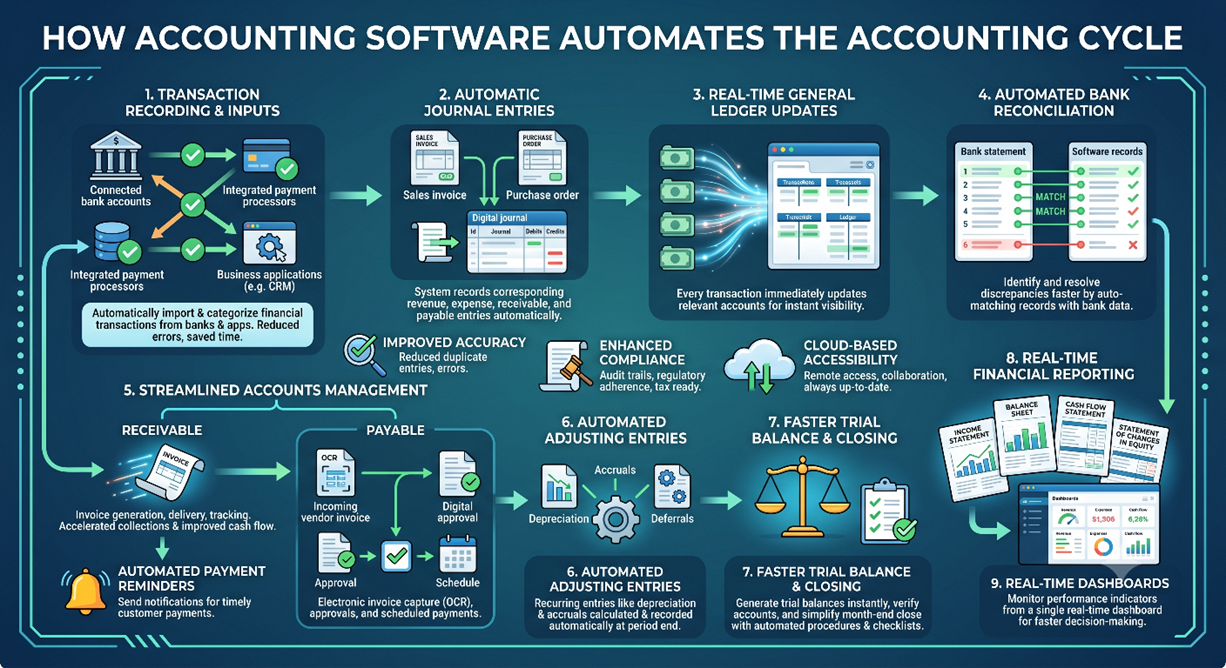
One of the primary benefits of accounting software is the automatic recording of financial transactions. Instead of manually entering every transaction into journals, businesses can connect bank accounts, payment processors, and business applications directly to the accounting system. Transactions are automatically imported and categorized based on predefined rules.
This automation reduces data entry errors, saves time, and ensures that financial records remain current. Businesses can maintain accurate books without spending hours entering routine transactions manually.
Automatic Journal Entries
Accounting software can automatically generate journal entries based on business activities. For example, when a sales invoice is created, the system automatically records the corresponding revenue and accounts receivable entries. Similarly, when a payment is received, the software records the cash receipt and updates customer balances.
Automated journal entries ensure consistency, reduce manual work, and help maintain compliance with double-entry accounting principles.
Real-Time General Ledger Updates
In traditional accounting systems, journal entries must be manually posted to the general ledger. Modern accounting software performs this process automatically. Every recorded transaction immediately updates the relevant ledger accounts, providing real-time visibility into account balances.
This automation allows business owners and finance teams to access up-to-date financial information at any time, improving decision-making and financial control.
Automated Bank Reconciliation
Bank reconciliation is often one of the most time-consuming aspects of the accounting cycle. Accounting software simplifies this process by automatically matching recorded transactions with bank statement data. The system identifies matching transactions and highlights discrepancies for review.
Automated reconciliation reduces manual effort, improves accuracy, and helps businesses identify errors or fraudulent transactions more quickly.
Streamlined Accounts Receivable Management
Accounting software automates many accounts receivable functions, including invoice generation, invoice delivery, payment tracking, and customer account management. Businesses can create invoices with a few clicks and send them directly to customers through email or customer portals.
The system can also track outstanding balances, monitor due dates, and provide real-time visibility into customer payment status. This automation helps accelerate collections and improve cash flow management.
Automated Payment Reminders
Late payments can negatively impact cash flow and business operations. Many accounting systems include automated reminder features that send payment notifications before and after invoice due dates. These reminders encourage timely payments without requiring manual follow-up from accounting staff.
Automated reminders improve collection rates and reduce the workload associated with accounts receivable management.
Efficient Accounts Payable Processing
Accounting software also automates accounts payable activities. Vendor invoices can be entered electronically, approved through workflow systems, and scheduled for payment. Some platforms use optical character recognition (OCR) technology to extract invoice data automatically.
This automation reduces processing time, minimizes errors, and helps businesses take advantage of early payment discounts when available.
Automated Adjusting Entries
Many accounting systems can automatically calculate and record recurring adjusting entries, such as depreciation, amortization, accrued expenses, and prepaid expense allocations. This ensures that adjustments are recorded consistently and accurately at the end of each accounting period.
Automating these entries reduces the risk of omissions and simplifies the month-end and year-end closing processes.
Faster Trial Balance Preparation
Because accounting software continuously updates account balances, trial balances can be generated instantly. Accountants no longer need to manually compile account information from multiple sources. The system automatically verifies debit and credit balances and produces accurate trial balance reports.
This capability helps accounting teams identify issues more quickly and accelerates financial reporting.
Automated Financial Statement Generation
Preparing financial statements manually can be time-consuming and prone to errors. Accounting software automatically compiles data from the general ledger and generates key financial reports, including:
- Income Statement
- Balance Sheet
- Cash Flow Statement
- Statement of Changes in Equity
- Trial Balance Reports
These reports can often be generated with a single click, providing real-time insights into business performance.
Simplified Month-End Closing
The month-end closing process involves reviewing transactions, recording adjustments, reconciling accounts, and preparing financial statements. Accounting software automates many of these tasks and provides closing checklists to ensure that all required procedures are completed.
Automation reduces closing time, improves accuracy, and allows organizations to produce financial reports more quickly.
Real-Time Financial Reporting and Dashboards
Modern accounting platforms offer real-time dashboards that display important financial metrics and performance indicators. Business owners and managers can monitor revenue, expenses, profitability, cash flow, accounts receivable, and accounts payable from a single dashboard.
Access to real-time financial data supports faster decision-making and helps businesses respond quickly to changing conditions.
Improved Accuracy and Reduced Errors
Manual accounting processes are vulnerable to mistakes such as duplicate entries, incorrect calculations, and posting errors. Accounting software reduces these risks through automated calculations, built-in validations, and standardized workflows.
By minimizing human intervention, businesses can improve the accuracy of financial records and reduce the time spent correcting errors.
Enhanced Compliance and Audit Readiness
Accounting software maintains detailed audit trails that record every transaction, adjustment, approval, and system change. This transparency helps businesses comply with accounting standards, tax regulations, and audit requirements.
During audits, organizations can quickly retrieve supporting documentation and transaction histories, making the audit process more efficient.
Cloud-Based Accessibility
Many modern accounting systems operate in the cloud, allowing users to access financial information from anywhere with an internet connection. Cloud-based accounting software supports remote work, improves collaboration, and ensures that financial data is always available when needed.
Automatic software updates also ensure that businesses benefit from the latest features, security enhancements, and regulatory updates.
Popular Accounting Software Solutions
Businesses in the United States commonly use accounting software such as:
- QuickBooks Online
- Xero
- Sage Intacct
- NetSuite
- FreshBooks
- Zoho Books
These solutions offer varying levels of automation, reporting capabilities, and integrations to support businesses of different sizes and industries.
Frequently Asked Questions (FAQs) About the Accounting Cycle
1. What is the accounting cycle?
The accounting cycle is a systematic process used to identify, record, classify, summarize, and report financial transactions during an accounting period. It helps businesses maintain accurate financial records and prepare reliable financial statements.
2. Why is the accounting cycle important?
The accounting cycle ensures the accuracy of financial records, supports informed decision-making, helps maintain regulatory compliance, and provides stakeholders with reliable financial information about the business.
3. How many steps are there in the accounting cycle?
The accounting cycle typically consists of eight steps: identifying transactions, recording journal entries, posting to the ledger, preparing an unadjusted trial balance, recording adjusting entries, preparing an adjusted trial balance, preparing financial statements, and closing temporary accounts.
4. What is the purpose of journal entries in the accounting cycle?
Journal entries are used to record financial transactions using the double-entry accounting method. They ensure that every transaction affects at least two accounts and that total debits equal total credits.
5. What is the difference between a journal and a ledger?
A journal records transactions in chronological order as they occur, while a ledger organizes those transactions by account to show account balances and activity over time.
6. What is a trial balance?
A trial balance is a report that lists all account balances at a specific point in time. Its primary purpose is to verify that total debits equal total credits before financial statements are prepared.
7. What are adjusting entries?
Adjusting entries are journal entries made at the end of an accounting period to ensure revenues and expenses are recognized in the correct period according to the accrual accounting principle.
8. Why are adjusting entries necessary?
Adjusting entries help provide accurate financial reporting by matching revenues with related expenses and ensuring that account balances reflect the true financial position of the business.
9. What are temporary accounts?
Temporary accounts include revenue, expense, dividend, and withdrawal accounts. These accounts are closed at the end of the accounting period and reset to zero for the next reporting period.
10. What is the closing process in accounting?
The closing process involves transferring balances from temporary accounts to retained earnings or owner’s equity. This prepares the accounting system for the next accounting period.
11. How often is the accounting cycle completed?
Most businesses complete the accounting cycle monthly, quarterly, and annually. The frequency depends on the company’s reporting requirements and management needs.
12. What is the difference between the accounting cycle and the operating cycle?
The accounting cycle focuses on recording and reporting financial transactions, while the operating cycle measures the time it takes to purchase inventory, sell products, and collect cash from customers.
13. Can small businesses benefit from the accounting cycle?
Yes. Small businesses benefit greatly from the accounting cycle because it helps maintain organized records, monitor profitability, manage cash flow, and simplify tax preparation.
14. How does accounting software help with the accounting cycle?
Accounting software automates many tasks such as transaction recording, invoicing, reconciliations, journal entries, financial reporting, and month-end closing, making the process faster and more accurate.
15. What are the most common accounting cycle errors?
Common errors include data entry mistakes, omitted transactions, incorrect account classifications, duplicate entries, posting errors, and inaccurate adjusting entries.
16. What financial statements are produced during the accounting cycle?
The accounting cycle typically produces the Income Statement, Balance Sheet, Cash Flow Statement, and Statement of Changes in Equity.
17. What is the difference between cash accounting and accrual accounting in the accounting cycle?
Cash accounting records transactions when cash is received or paid, whereas accrual accounting records revenues and expenses when they are earned or incurred, regardless of when cash changes hands.
18. Who is responsible for managing the accounting cycle?
Depending on the size of the organization, the accounting cycle may be managed by accountants, bookkeepers, controllers, finance managers, or an entire accounting department.
19. What challenges can businesses face during the accounting cycle?
Businesses may face challenges such as manual processing errors, delayed transaction recording, missing documentation, reconciliation issues, compliance requirements, and inadequate internal controls.
20. How can businesses improve the efficiency of the accounting cycle?
Businesses can improve efficiency by using accounting software, maintaining accurate documentation, automating repetitive tasks, performing regular reconciliations, implementing strong internal controls, and providing ongoing training to accounting staff.
