
Accounting is the foundation of every successful business. Whether you’re a small business owner, startup founder, accountant, or financial manager, accurate financial records are essential for making informed decisions and maintaining compliance. At the heart of every accounting system lies the General Ledger (GL)—the master record that captures and organizes all financial transactions.
The General Ledger serves as the central repository for a company’s financial data. Every transaction, from sales and purchases to payroll and loan payments, ultimately flows into the ledger. Without a properly maintained General Ledger, preparing financial statements, monitoring cash flow, and assessing business performance would be nearly impossible.
In today’s digital business environment, accounting software automates much of the ledger process. However, understanding how the General Ledger works remains critical for business owners and accounting professionals alike. A strong grasp of the General Ledger helps organizations improve financial accuracy, detect errors, streamline audits, and ensure compliance with accounting standards.
This comprehensive guide explains everything you need to know about the General Ledger, including its purpose, structure, components, examples, accounting entries, benefits, challenges, and best practices.
What Is a General Ledger?
A General Ledger (GL) is the primary accounting record that contains all financial transactions of a business organized into various accounts. It serves as the backbone of the accounting system and provides a complete history of financial activity.
Every transaction recorded in journals eventually gets posted to the General Ledger. The ledger categorizes transactions into specific accounts, making it easier to track assets, liabilities, equity, revenue, and expenses.
Simply put, the General Ledger acts as the company’s financial database.
Definition
A General Ledger is a master accounting document that summarizes and records all financial transactions of a business according to the double-entry bookkeeping system.
The information stored in the General Ledger is used to create important financial reports, including:
- Balance Sheet
- Income Statement
- Cash Flow Statement
- Trial Balance
- Statement of Retained Earnings
Understanding the Double-Entry Accounting System
The General Ledger operates under the double-entry accounting system.
Under this method:
- Every transaction affects at least two accounts.
- Total debits must equal total credits.
Example
A company purchases office furniture worth $5,000 in cash.
| Account | Debit | Credit |
| Furniture | $5,000 | |
| Cash | $5,000 |
This transaction increases furniture assets and decreases cash assets.
Because both sides are equal, the accounting equation remains balanced.
Components of a General Ledger
A General Ledger (GL) is the central repository of a company’s financial information. Every financial transaction recorded by a business is ultimately posted to the General Ledger, making it one of the most important accounting records. To organize and track financial data effectively, a General Ledger contains several key components. Each component plays a specific role in ensuring transactions are recorded accurately and can be easily reviewed, analyzed, and reported.
- Account Number
An account number is a unique identifier assigned to each account in the General Ledger. These numbers help organize accounts systematically and make it easier to locate, record, and report financial transactions. Most businesses use a Chart of Accounts (COA) where account numbers are grouped by category, such as assets, liabilities, equity, revenue, and expenses.
For example:
| Account | Number |
| Cash | 1000 |
| Accounts Receivable | 1100 |
| Inventory | 1200 |
| Accounts Payable | 2000 |
| Sales Revenue | 4000 |
Using account numbers improves consistency in bookkeeping and allows accounting software to process transactions efficiently.
- Account Name
The account name identifies the purpose of the account and describes the type of financial activity being tracked. While account numbers provide a numerical reference, account names make it easier for accountants and business owners to understand what each account represents.
Examples of account names include:
- Cash
- Inventory
- Accounts Receivable
- Rent Expense
- Salaries Expense
- Sales Revenue
Each account name corresponds to a specific category within the company’s financial records and helps ensure transactions are classified correctly.
- Transaction Date
The transaction date indicates the exact date on which a financial event occurred. Recording the correct date is essential because it determines the accounting period in which the transaction will be reported.
For example, if a customer payment is received on June 15, the transaction date should reflect June 15. Accurate transaction dates help businesses prepare reliable monthly, quarterly, and annual financial statements while ensuring compliance with accounting principles.
- Description
The description field provides details about the transaction being recorded. It serves as a brief explanation that helps users understand the purpose of the entry without needing to review supporting documents.
Examples of transaction descriptions include:
- Office supplies purchase
- Customer payment received
- Utility bill payment
- Equipment purchase
- Monthly rent expense
A clear description improves recordkeeping, simplifies audits, and makes it easier to investigate discrepancies or unusual transactions.
- Debit Amount
The debit amount records the value entered on the debit side of an account. In double-entry accounting, debits are used to increase or decrease accounts depending on the account type.
Generally:
- Assets increase with debits.
- Expenses increase with debits.
- Liabilities decrease with debits.
- Equity decreases with debits.
- Revenue decreases with debits.
For example, when a business purchases equipment for cash, the equipment account is debited because assets are increasing.
Accurate debit entries are critical for maintaining balanced accounting records and ensuring financial statements are correct.
- Credit Amount
The credit amount records the value entered on the credit side of an account. Like debits, credits affect different account types in different ways.
Generally:
- Liabilities increase with credits.
- Equity increases with credits.
- Revenue increases with credits.
- Assets decrease with credits.
- Expenses decrease with credits.
For example, when a company makes a sale, the Sales Revenue account is credited because revenue is increasing.
Every debit entry must have an equal credit entry, ensuring that the accounting equation remains balanced.
- Balance
The balance is the running total of an account after each transaction is recorded. It reflects the current financial position of that specific account and updates whenever a new debit or credit entry is posted.
For example:
| Date | Description | Debit | Credit | Balance |
| June 1 | Opening Balance | $10,000 | $10,000 | |
| June 5 | Customer Payment | $2,000 | $12,000 | |
| June 10 | Utility Bill Payment | $500 | $11,500 |
The balance allows accountants and business owners to quickly determine how much cash is available, how much is owed to vendors, or how much revenue has been generated. Running balances are essential for preparing financial statements and monitoring business performance.
Example of a General Ledger Posting
| Date | Account Number | Account Name | Description | Debit | Credit | Balance |
| June 1 | 1000 | Cash | Opening Balance | $10,000 | $10,000 | |
| June 5 | 1000 | Cash | Customer Payment | $2,000 | $12,000 | |
| June 10 | 1000 | Cash | Utility Payment | $500 | $11,500 |
General Ledger vs Journal
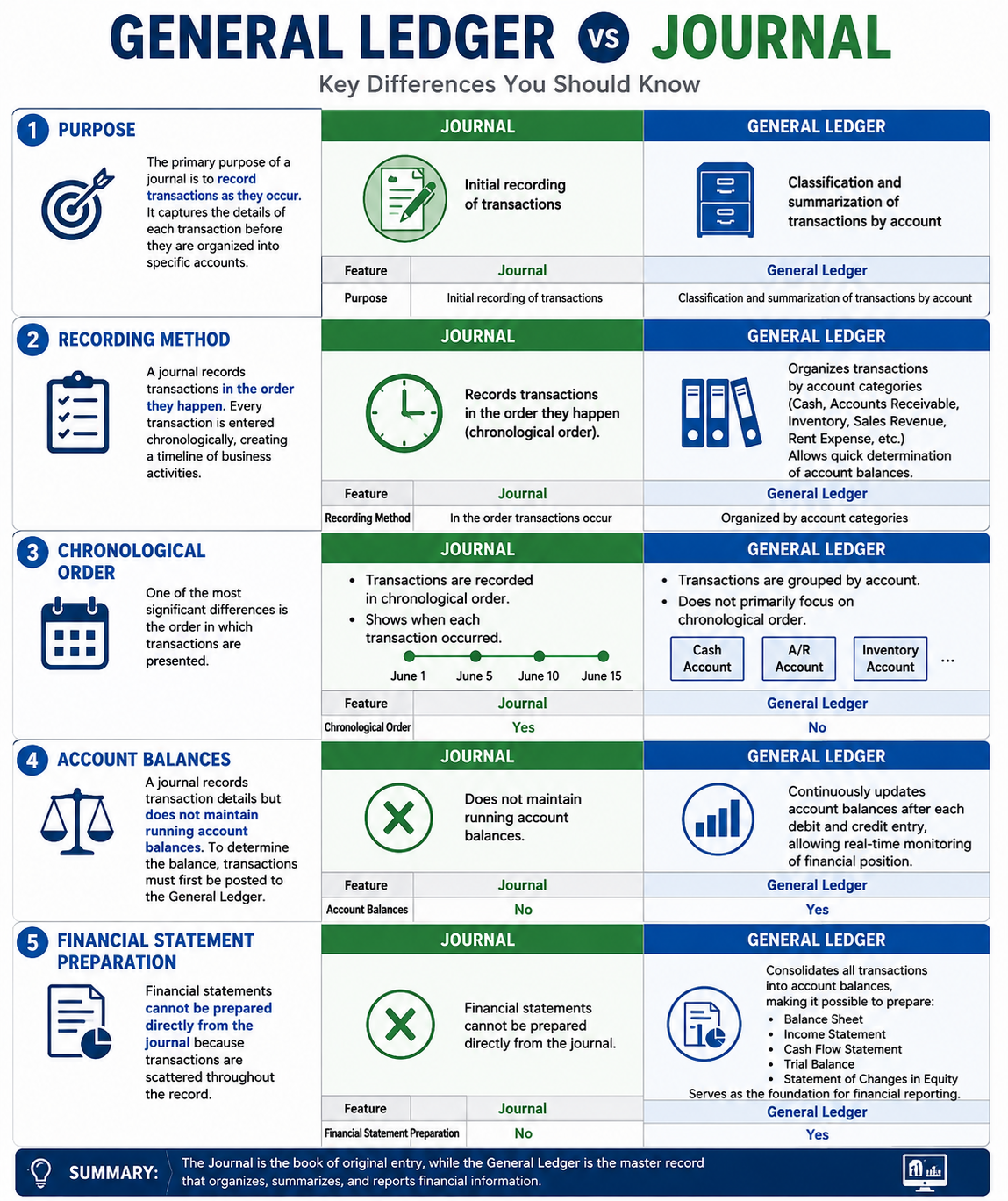
- Purpose
The primary purpose of a journal is to record transactions as they occur. It captures the details of each transaction before they are organized into specific accounts.
The General Ledger, on the other hand, is used to classify and summarize those transactions into individual accounts. It provides a structured view of a company’s financial activity.
| Feature | Journal | General Ledger |
| Purpose | Initial recording of transactions | Classification and summarization of transactions by account |
- Recording Method
A journal records transactions in the order they happen. Every transaction is entered chronologically, creating a timeline of business activities.
The General Ledger organizes transactions by account categories such as Cash, Accounts Receivable, Inventory, Sales Revenue, and Rent Expense.
This allows accountants to quickly determine the balance of each account.
- Chronological Order
One of the most significant differences between a journal and a ledger is the order in which transactions are presented.
Journal:
- Transactions are recorded in chronological order.
- Shows when each transaction occurred.
General Ledger:
- Transactions are grouped by account.
- Does not primarily focus on chronological order.
For example, a journal may show every transaction made during June in sequence, while the ledger separates those transactions into individual account records.
| Feature | Journal | General Ledger |
| Chronological Order | Yes | No |
- Account Balances
A journal records transaction details but does not maintain running account balances.
To determine the balance of an account, transactions must first be posted to the General Ledger.
The General Ledger continuously updates account balances after each debit and credit entry, allowing businesses to monitor their financial position in real time.
| Feature | Journal | General Ledger |
| Account Balances | No | Yes |
- Financial Statement Preparation
Financial statements cannot be prepared directly from the journal because transactions are scattered throughout the record.
The General Ledger consolidates all transactions into account balances, making it possible to prepare:
- Balance Sheet
- Income Statement
- Cash Flow Statement
- Trial Balance
- Statement of Changes in Equity
Therefore, the General Ledger serves as the foundation for financial reporting.
| Feature | Journal | General Ledger |
| Financial Statement Preparation | No | Yes |
Process Flow
Transaction → Journal Entry → General Ledger → Trial Balance → Financial Statements
How Transactions Flow into the General Ledger
The accounting cycle follows a structured process.
Step 1: Transaction Occurs
Example:
A customer purchases goods worth $1,000.
Step 2: Journal Entry
| Account | Debit | Credit |
| Accounts Receivable | $1,000 | |
| Sales Revenue | $1,000 |
Step 3: Posting to Ledger
The transaction is posted to both affected ledger accounts.
Step 4: Updating Balances
Running balances are adjusted.
Step 5: Preparing Reports
The updated ledger data supports financial reporting.
General Ledger Example
Assume ABC Manufacturing has the following transactions:
Transaction 1
Owner invests $50,000.
| Account | Debit | Credit |
| Cash | $50,000 | |
| Owner’s Capital | $50,000 |
Transaction 2
Purchased equipment for $10,000 cash.
| Account | Debit | Credit |
| Equipment | $10,000 | |
| Cash | $10,000 |
Transaction 3
Sold products for $8,000 on credit.
| Account | Debit | Credit |
| Accounts Receivable | $8,000 | |
| Sales Revenue | $8,000 |
Cash Ledger
| Date | Description | Debit | Credit | Balance |
| Opening | Owner Investment | $50,000 | $50,000 | |
| Purchase | Equipment | $10,000 | $40,000 |
Chart of Accounts and the General Ledger
A Chart of Accounts (COA) is a structured list of all accounts used by a business. The General Ledger uses these accounts to categorize transactions.
Sample Chart of Accounts
Assets (1000–1999)
- Cash
- Accounts Receivable
- Inventory
Liabilities (2000–2999)
- Accounts Payable
- Loans Payable
Equity (3000–3999)
- Owner’s Capital
- Retained Earnings
Revenue (4000–4999)
- Sales Revenue
- Service Revenue
Expenses (5000–5999)
- Rent Expense
- Utilities Expense
- Salaries Expense
Common General Ledger Errors
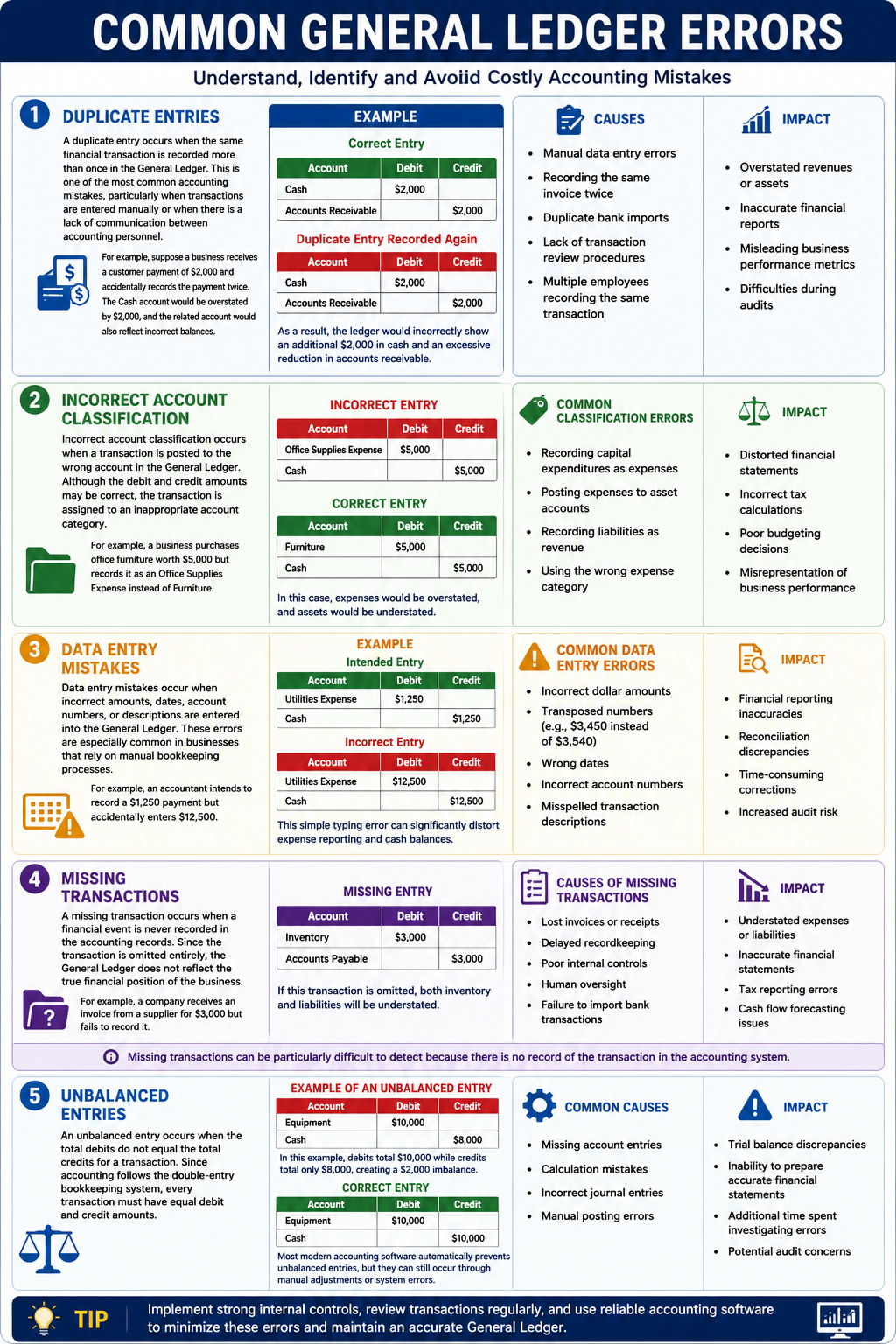
1. Duplicate Entries
A duplicate entry occurs when the same financial transaction is recorded more than once in the General Ledger. This is one of the most common accounting mistakes, particularly when transactions are entered manually or when there is a lack of communication between accounting personnel.
For example, suppose a business receives a customer payment of $2,000 and accidentally records the payment twice. The Cash account would be overstated by $2,000, and the related account would also reflect incorrect balances.
Example
Correct Entry
| Account | Debit | Credit |
| Cash | $2,000 | |
| Accounts Receivable | $2,000 |
Duplicate Entry Recorded Again
| Account | Debit | Credit |
| Cash | $2,000 | |
| Accounts Receivable | $2,000 |
As a result, the ledger would incorrectly show an additional $2,000 in cash and an excessive reduction in accounts receivable.
Causes of Duplicate Entries
- Manual data entry errors
- Recording the same invoice twice
- Duplicate bank imports
- Lack of transaction review procedures
- Multiple employees recording the same transaction
Impact
- Overstated revenues or assets
- Inaccurate financial reports
- Misleading business performance metrics
- Difficulties during audits
2. Incorrect Account Classification
Incorrect account classification occurs when a transaction is posted to the wrong account in the General Ledger. Although the debit and credit amounts may be correct, the transaction is assigned to an inappropriate account category.
For example, a business purchases office furniture worth $5,000 but records it as an Office Supplies Expense instead of Furniture.
Incorrect Entry
| Account | Debit | Credit |
| Office Supplies Expense | $5,000 | |
| Cash | $5,000 |
Correct Entry
| Account | Debit | Credit |
| Furniture | $5,000 | |
| Cash | $5,000 |
In this case, expenses would be overstated, and assets would be understated.
Common Classification Errors
- Recording capital expenditures as expenses
- Posting expenses to asset accounts
- Recording liabilities as revenue
- Using the wrong expense category
Impact
- Distorted financial statements
- Incorrect tax calculations
- Poor budgeting decisions
- Misrepresentation of business performance
- Data Entry Mistakes
Data entry mistakes occur when incorrect amounts, dates, account numbers, or descriptions are entered into the General Ledger. These errors are especially common in businesses that rely on manual bookkeeping processes.
For example, an accountant intends to record a $1,250 payment but accidentally enters $12,500.
Example
Intended Entry
| Account | Debit | Credit |
| Utilities Expense | $1,250 | |
| Cash | $1,250 |
Incorrect Entry
| Account | Debit | Credit |
| Utilities Expense | $12,500 | |
| Cash | $12,500 |
This simple typing error can significantly distort expense reporting and cash balances.
Common Data Entry Errors
- Incorrect dollar amounts
- Transposed numbers (e.g., $3,450 instead of $3,540)
- Wrong dates
- Incorrect account numbers
- Misspelled transaction descriptions
Impact
- Financial reporting inaccuracies
- Reconciliation discrepancies
- Time-consuming corrections
- Increased audit risk
- Missing Transactions
A missing transaction occurs when a financial event is never recorded in the accounting records. Since the transaction is omitted entirely, the General Ledger does not reflect the true financial position of the business.
For example, a company receives an invoice from a supplier for $3,000 but fails to record it.
Missing Entry
| Account | Debit | Credit |
| Inventory | $3,000 | |
| Accounts Payable | $3,000 |
If this transaction is omitted, both inventory and liabilities will be understated.
Causes of Missing Transactions
- Lost invoices or receipts
- Delayed recordkeeping
- Poor internal controls
- Human oversight
- Failure to import bank transactions
Impact
- Understated expenses or liabilities
- Inaccurate financial statements
- Tax reporting errors
- Cash flow forecasting issues
Missing transactions can be particularly difficult to detect because there is no record of the transaction in the accounting system.
- Unbalanced Entries
An unbalanced entry occurs when the total debits do not equal the total credits for a transaction. Since accounting follows the double-entry bookkeeping system, every transaction must have equal debit and credit amounts.
Example of an Unbalanced Entry
| Account | Debit | Credit |
| Equipment | $10,000 | |
| Cash | $8,000 |
In this example, debits total $10,000 while credits total only $8,000, creating a $2,000 imbalance.
Correct Entry
| Account | Debit | Credit |
| Equipment | $10,000 | |
| Cash | $10,000 |
Most modern accounting software automatically prevents unbalanced entries, but they can still occur through manual adjustments or system errors.
Common Causes
- Missing account entries
- Calculation mistakes
- Incorrect journal entries
- Manual posting errors
Impact
- Trial balance discrepancies
- Inability to prepare accurate financial statements
- Additional time spent investigating errors
- Potential audit concerns
General Ledger Reconciliation
Reconciliation ensures ledger balances match supporting records.
Common Reconciliations
- Bank Reconciliation
- Accounts Receivable Reconciliation
- Accounts Payable Reconciliation
- Inventory Reconciliation
Benefits
- Detects errors
- Prevents fraud
- Improves financial accuracy
Best Practices for Managing a General Ledger
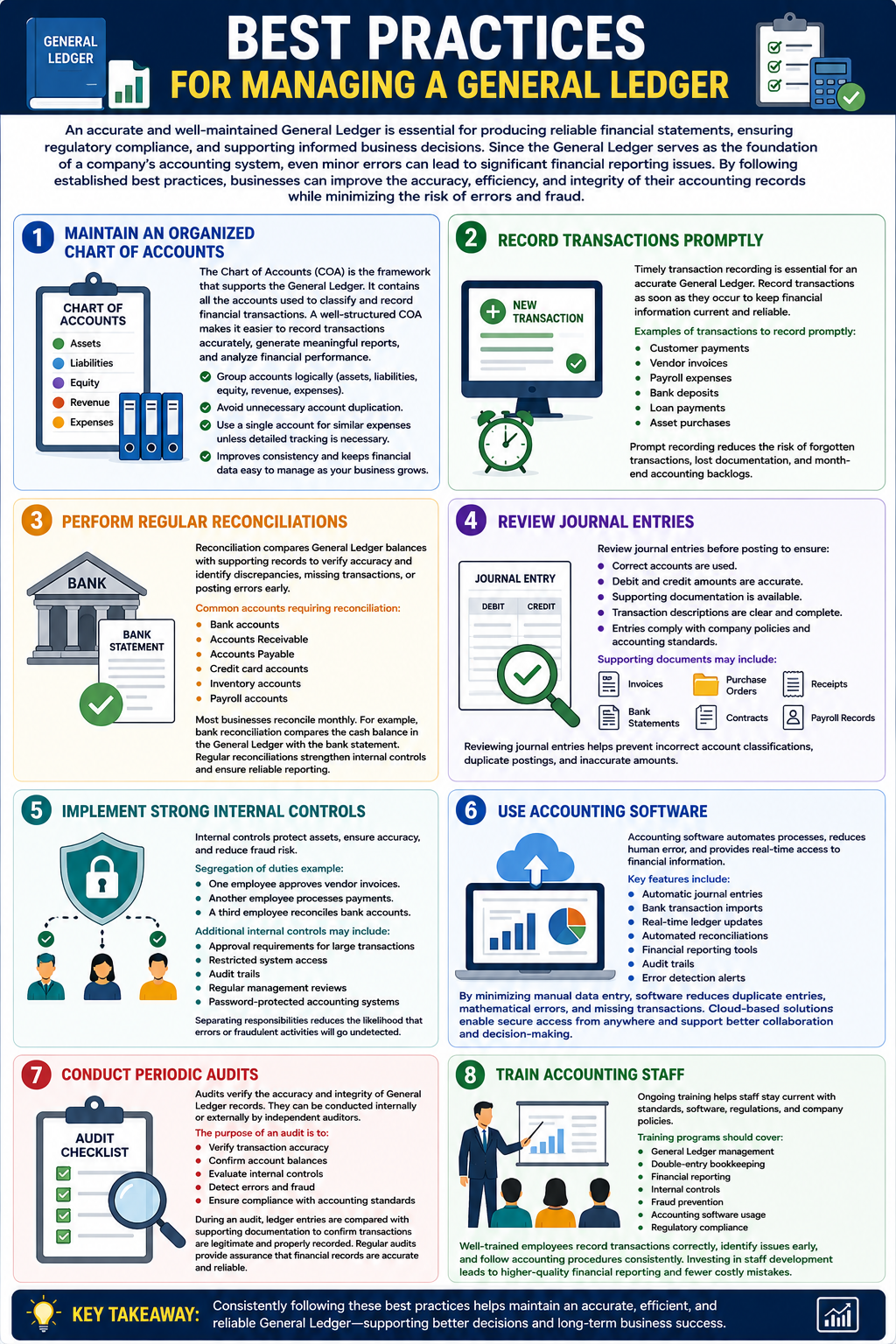
An accurate and well-maintained General Ledger is essential for producing reliable financial statements, ensuring regulatory compliance, and supporting informed business decisions. Since the General Ledger serves as the foundation of a company’s accounting system, even minor errors can lead to significant financial reporting issues. By following established best practices, businesses can improve the accuracy, efficiency, and integrity of their accounting records while minimizing the risk of errors and fraud.
- Maintain an Organized Chart of Accounts
The Chart of Accounts (COA) is the framework that supports the General Ledger. It contains all the accounts used to classify and record financial transactions. A well-structured Chart of Accounts makes it easier to record transactions accurately, generate meaningful reports, and analyze financial performance.
Businesses should design their Chart of Accounts logically, grouping accounts into categories such as assets, liabilities, equity, revenue, and expenses. Unnecessary account duplication should be avoided because it can create confusion, increase the likelihood of posting errors, and complicate financial reporting.
For example, instead of creating multiple accounts for similar expenses, such as “Office Supplies Expense A” and “Office Supplies Expense B,” businesses should use a single account unless detailed tracking is necessary.
An organized Chart of Accounts improves consistency and ensures that financial data remains easy to manage as the business grows.
- Record Transactions Promptly
Timely transaction recording is one of the most important practices for maintaining an accurate General Ledger. Delays in recording transactions can result in incomplete financial records, inaccurate account balances, and poor decision-making.
Businesses should record transactions as soon as they occur whenever possible. Real-time recording helps ensure that financial information is always current and reflects the organization’s actual financial position.
Examples of transactions that should be recorded promptly include:
- Customer payments
- Vendor invoices
- Payroll expenses
- Bank deposits
- Loan payments
- Asset purchases
Prompt recording also reduces the risk of forgotten transactions, lost documentation, and month-end accounting backlogs.
- Perform Regular Reconciliations
Reconciliation is the process of comparing General Ledger balances with supporting records to verify accuracy. Regular reconciliations help identify discrepancies, missing transactions, duplicate entries, and posting errors before they become larger problems.
Most businesses perform reconciliations monthly, although high-volume organizations may reconcile certain accounts weekly or even daily.
Common accounts requiring reconciliation include:
- Bank
- Accounts receivable
- Accounts payable
- Credit card accounts
- Inventory accounts
- Payroll accounts
For example, a bank reconciliation compares the cash balance in the General Ledger with the balance shown on the bank statement. Any differences are investigated and corrected.
Regular reconciliations improve financial accuracy, strengthen internal controls, and ensure reliable reporting.
- Review Journal Entries
Journal entries are the foundation of General Ledger records. Every transaction recorded in the accounting system begins with a journal entry that is later posted to the appropriate ledger accounts.
Before posting journal entries, businesses should review them carefully to ensure:
- Correct accounts are used.
- Debit and credit amounts are accurate.
- Supporting documentation is available.
- Transaction descriptions are clear and complete.
- Entries comply with company policies and accounting standards.
Supporting documents may include:
- Invoices
- Purchase orders
- Receipts
- Bank statements
- Contracts
- Payroll records
Reviewing journal entries helps prevent errors such as incorrect account classifications, duplicate postings, and inaccurate transaction amounts.
- Implement Strong Internal Controls
Internal controls are policies and procedures designed to protect company assets, ensure accounting accuracy, and reduce the risk of fraud.
One of the most effective internal control practices is the segregation of duties. This means that different employees should handle different aspects of a transaction.
For example:
- One employee approves vendor invoices.
- Another employee processes payments.
- A third employee reconciles bank accounts.
Separating responsibilities reduces the likelihood that errors or fraudulent activities will go undetected.
Additional internal controls may include:
- Approval requirements for large transactions
- Restricted system access
- Audit trails
- Regular management reviews
- Password-protected accounting systems
Strong internal controls improve the reliability of General Ledger information and protect the business from financial misconduct.
- Use Accounting Software
Modern accounting software has transformed General Ledger management by automating many manual bookkeeping tasks. Automated systems reduce human error, improve efficiency, and provide real-time access to financial information.
Popular accounting software platforms offer features such as:
- Automatic journal entries
- Bank transaction imports
- Real-time ledger updates
- Automated reconciliations
- Financial reporting tools
- Audit trails
- Error detection alerts
By reducing manual data entry, accounting software minimizes the risk of duplicate entries, mathematical errors, and missing transactions.
In addition, cloud-based accounting solutions allow authorized users to access financial information from anywhere, improving collaboration and decision-making.
- Conduct Periodic Audits
Periodic audits help verify the accuracy and integrity of General Ledger records. Audits can be performed internally by company personnel or externally by independent auditors.
The purpose of an audit is to:
- Verify transaction accuracy
- Confirm account balances
- Evaluate internal controls
- Detect errors and fraud
- Ensure compliance with accounting standards
During an audit, ledger entries are often compared with supporting documentation to confirm that transactions are legitimate and properly recorded.
Regular audits provide an additional layer of assurance that financial records are accurate and reliable.
- Train Accounting Staff
Even the most advanced accounting systems require knowledgeable personnel to operate them effectively. Ongoing training helps accounting staff stay current with accounting standards, software updates, regulatory requirements, and company policies.
Training programs should cover topics such as:
- General Ledger management
- Double-entry bookkeeping
- Financial reporting
- Internal controls
- Fraud prevention
- Accounting software usage
- Regulatory compliance
Well-trained employees are more likely to record transactions correctly, identify potential issues, and follow established accounting procedures consistently.
Investing in staff development contributes to higher-quality financial reporting and reduces the risk of costly accounting mistakes.
General Ledger for Small Businesses
Small businesses often rely heavily on the General Ledger for:
- Expense tracking
- Cash management
- Tax preparation
- Budgeting
- Loan applications
Even a small company can benefit significantly from maintaining an accurate ledger.
General Ledger for Large Enterprises
Large organizations use advanced ledger systems to manage:
- Multiple departments
- Multiple locations
- International operations
- Consolidated reporting
- Regulatory compliance
Enterprise Resource Planning (ERP) systems often integrate directly with the General Ledger.
Frequently Asked Questions (FAQs)
- What is a General Ledger?
A General Ledger is the master accounting record that contains all financial transactions categorized by account.
- What is the purpose of a General Ledger?
It organizes financial data and supports financial reporting.
- What accounts are included in a General Ledger?
Assets, liabilities, equity, revenue, and expenses.
Conclusion
The General Ledger is the foundation of a company’s accounting system and serves as the central hub for recording, organizing, and analyzing financial transactions. Every financial activity—from sales and purchases to payroll and tax payments—ultimately flows through the General Ledger. By maintaining accurate ledger records, businesses can generate reliable financial statements, simplify tax preparation, improve cash flow management, support audits, and make informed strategic decisions.
Whether you’re running a small business, managing a growing company, or overseeing enterprise-level finances, understanding and maintaining a well-structured General Ledger is essential. Combined with modern accounting software, regular reconciliations, and strong internal controls, an effective General Ledger system can help organizations achieve greater financial accuracy, compliance, and long-term success.
